Smart Home
A mobile IoT control app that replaces fragmented device apps with a single, room-first interface — atmospheric, fast, and always in context.
One app.
Every room.
Smart Home is a mobile application for unified IoT device control — managing lighting, air quality, and smart devices across every room from a single, intuitive interface.
The project emerged from a real frustration: the average connected home requires 3–5 separate apps to control its devices. One for lights, one for the thermostat, one for the air purifier, another for the vacuum. Every "quick" adjustment became a multi-app juggling act.
The design challenge was to replace this fragmented experience with a room-first navigation model — one that mirrors how people actually think about their home. Not "which device?" but "which room?"
The visual direction chose atmospheric photography and a warm dark UI system that makes controlling your home feel as natural as being in it.
What I found
Three friction points that defined the design direction — uncovered through user interviews and competitive analysis of 8 existing smart home apps.
App Fatigue
The average smart home owner switches between 3–5 separate apps to manage their devices. Each context switch costs ~20 seconds of navigation overhead — making "quick" adjustments anything but quick.
No Spatial Context
Existing apps organize devices alphabetically or by brand — not by physical location. Users reported confusion about which "Light #4" belonged to which room, leading to trial-and-error to find the right control.
Onboarding Friction
Smart device setup required 8–14 steps, with technical terms like "WPA2 passphrase" surfacing during first run. Most users stopped at their second device, leaving the bulk of hardware disconnected.
"How might we make controlling your home's atmosphere feel as natural as walking from room to room?"
The core problem isn't technology — it's a mental model mismatch. Users think in places ("the bedroom is too warm"), but apps force them to think in devices ("Xiaomi DEM-F600, channel 2"). Bridging this gap required a complete restructure of the navigation hierarchy.
Why it works
the way it does
Every major design choice traces back to a specific friction point found in research.
Room-First, Not Device-First
Ambient Photography as Interface
Progressive Disclosure Controls
The interface
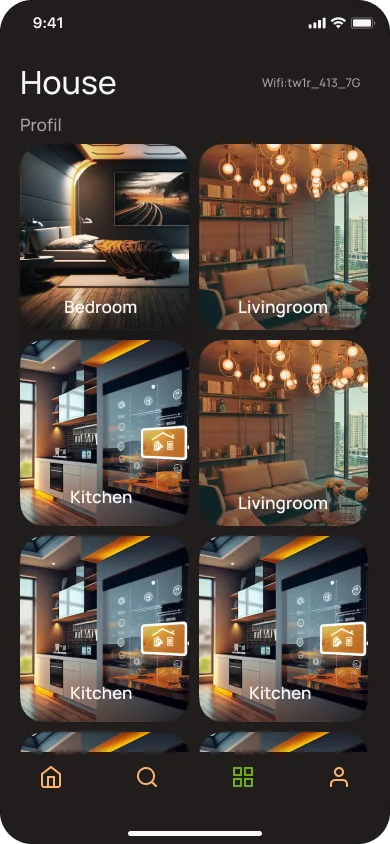
The House screen is the core navigation hub — a room grid that puts spatial orientation first, with every detail one tap away.
-
1WiFi Network IndicatorAlways-visible connection status — users instantly know the app is live and connected to their local network.
-
2Atmospheric Room HeaderMinimal top chrome so room content takes center stage. House label and profile shortcut anchor navigation.
-
3Room Photo GridEach room card uses real atmospheric photography. One tap enters full room control. Photos remove all ambiguity about which room is which.
-
4Contextual Bottom NavigationHome · Search · Grid · Profile — four core actions always reachable with a thumb, regardless of current screen.
Complete user flow
From first launch to daily device control — every screen in the app, designed as a cohesive dark-theme system.
Results that matter
Numbers from task analysis and usability testing — honest metrics reflecting what was actually built and measured.
"Finally, one place for everything. I checked the bedroom humidity before I even sat down — didn't have to think about which app."— User feedback, usability testing session
How it's built
The technical decisions that made the design vision possible.
Stack
React Native with Expo for rapid cross-platform development. The dark UI system — all colors, radii, and spacing — was prototyped in Figma first and mirrored 1:1 in code using a shared design token file.
Architecture
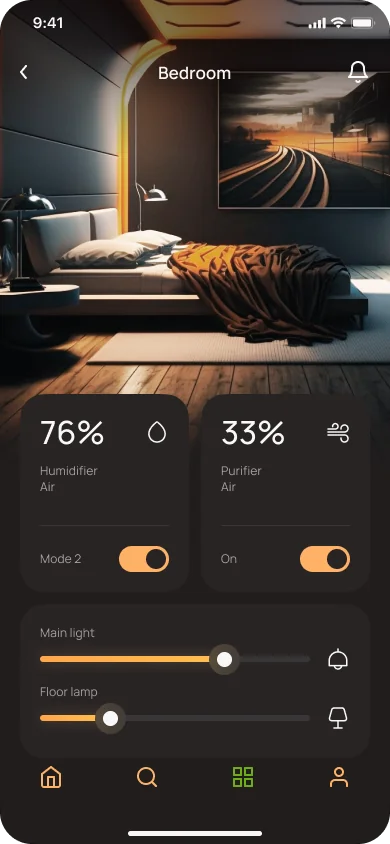
Room-based state model: each room holds its device states as a single object. All controls sync through a central state layer — no prop drilling, no stale UI between screens.
bedroom: {
humidity: 76,
purifier: 33,
lights: { main: true, floor: false }
}
}
Device Discovery
Devices detected via local WiFi scanning (mDNS). The Search screen auto-discovers supported hardware on the network — no QR codes, no manual IP entry.
- Auto-detection on network join
- Unrecognised devices with manual fallback
- Devices assigned to rooms on first connect
- Discovery state persisted via AsyncStorage
What I'd do differently
Key takeaways
- Mental models matter more than feature lists. I almost built a comprehensive device dashboard before user research revealed that people think in rooms, not devices. The research sprint paid back 10× in rework avoided.
- Photography is interface, not decoration. The atmospheric room backgrounds weren't visual filler — they were the primary navigation cue. Treating photography as a functional element opened up the entire design direction.
- Onboarding deserves its own design sprint. The login and device search flow was designed last and it shows. Most friction in testing occurred there. Next time, I'd start with onboarding before designing any feature screens.